
DCX Customer Portal
Empower your customers with 24/7 self-service access to their Business Central data
The DCX Customer Portal is a modern, secure web application that provides your customers with instant access to their orders, invoices, quotes, and account information directly from Business Central.
Key Features
Secure Microsoft Authentication
Single Sign-On (SSO) with Microsoft Entra ID ensures secure access for your customers using their existing Microsoft accounts.
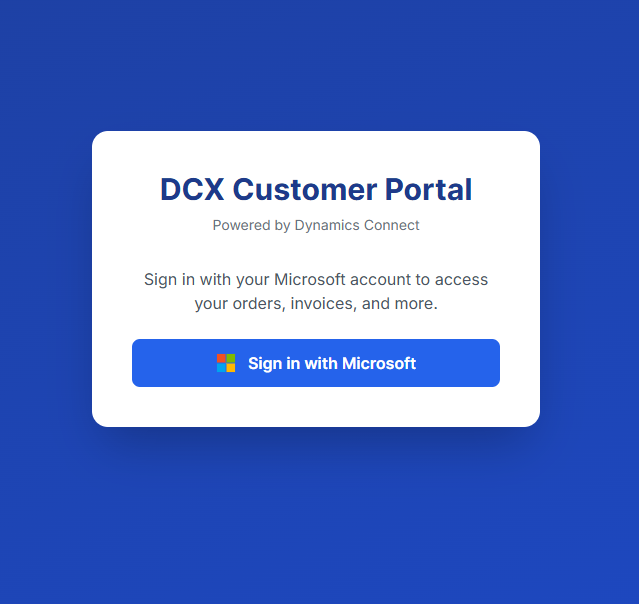
Simple, secure login with Microsoft authentication
Real-Time Dashboard
Customers see their critical business metrics at a glance with real-time data synchronised from Business Central.
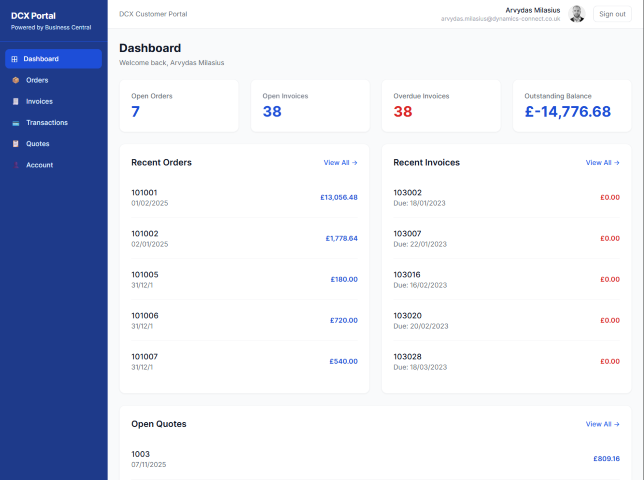
Comprehensive dashboard with key performance indicators
Dashboard Metrics
- Open Orders - Track active orders in progress
- Open Invoices - View outstanding payment obligations
- Overdue Invoices - Identify past-due amounts requiring attention
- Outstanding Balance - See total amount owed at a glance
Interactive metric cards provide instant visibility into account status
Orders Management
Complete Order Visibility
Customers can view all their sales orders with full details including line items, quantities, pricing, and delivery status.
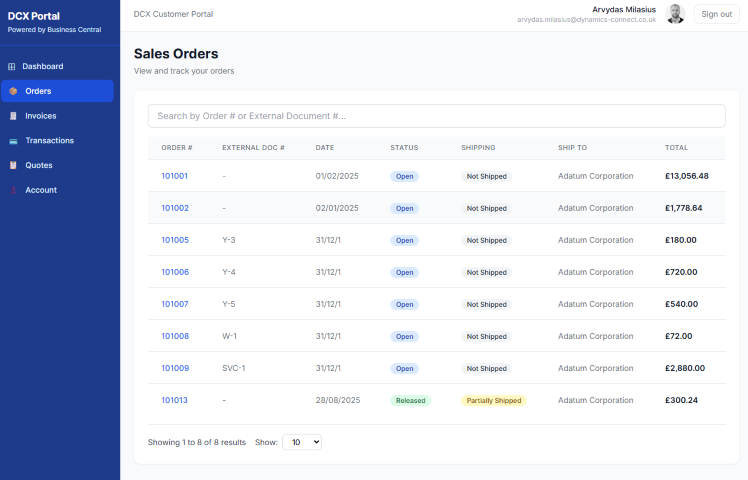
Clean, organised view of all sales orders
Order Details
Detailed view of each order including:
- Order number and date
- Customer reference
- Delivery address
- Order status (Open, Released, Pending)
- Line items with quantities and pricing
- Total amounts
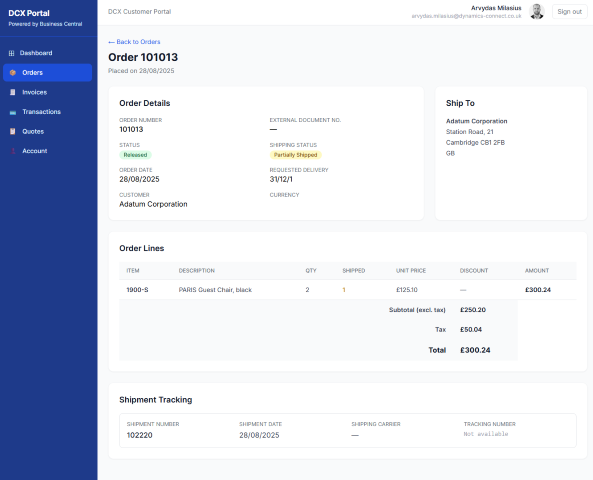
Comprehensive order information at your fingertips
Invoice Management
Invoice List & Tracking
View all invoices with clear status indicators, due dates, and payment information.
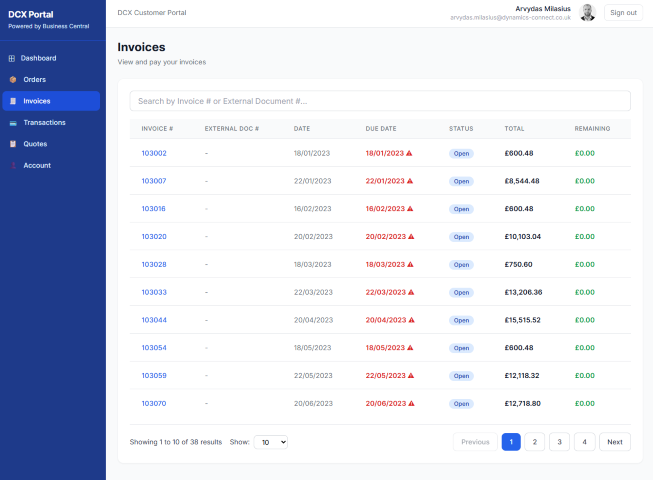
Easy-to-scan invoice list with status badges
Invoice Details
Access complete invoice information including:
- Invoice number and date
- Due date and payment terms
- Line item details
- Tax calculations
- Total amounts
- Payment status
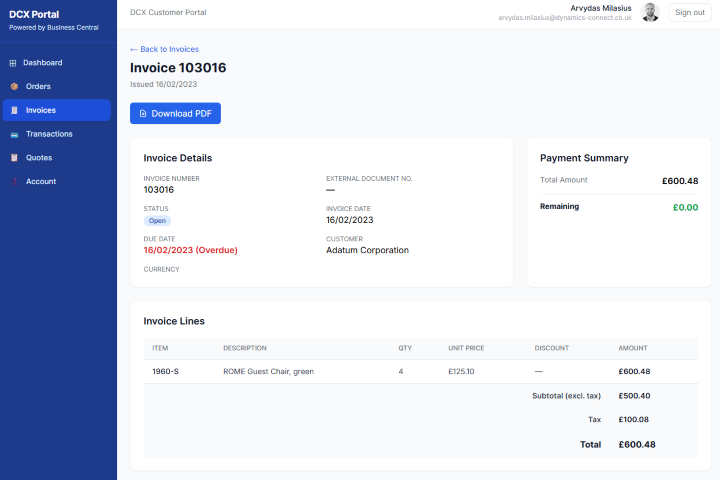
Detailed invoice view with all relevant information
PDF Download
Download invoices for record-keeping and accounting purposes.
Online Payment Integration
Integrated Stripe Payments
Customers can pay invoices instantly using credit cards through secure Stripe integration.
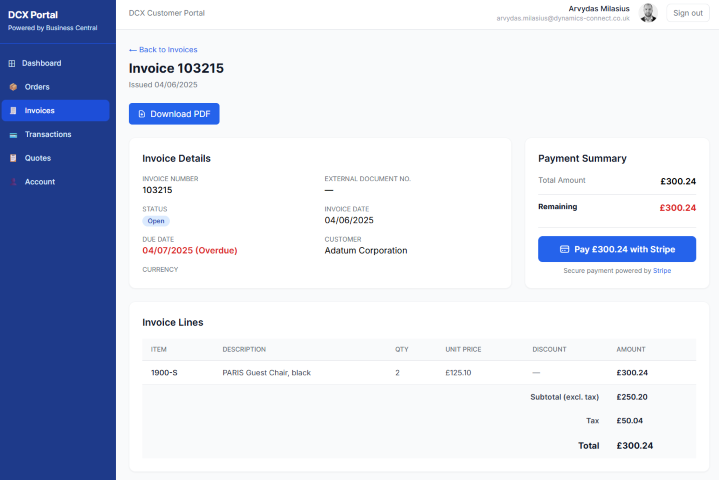
Convenient online payment option
Secure Payment Processing
- PCI-compliant payment handling
- Support for major credit cards
- Real-time payment confirmation
- Automatic Business Central synchronisation
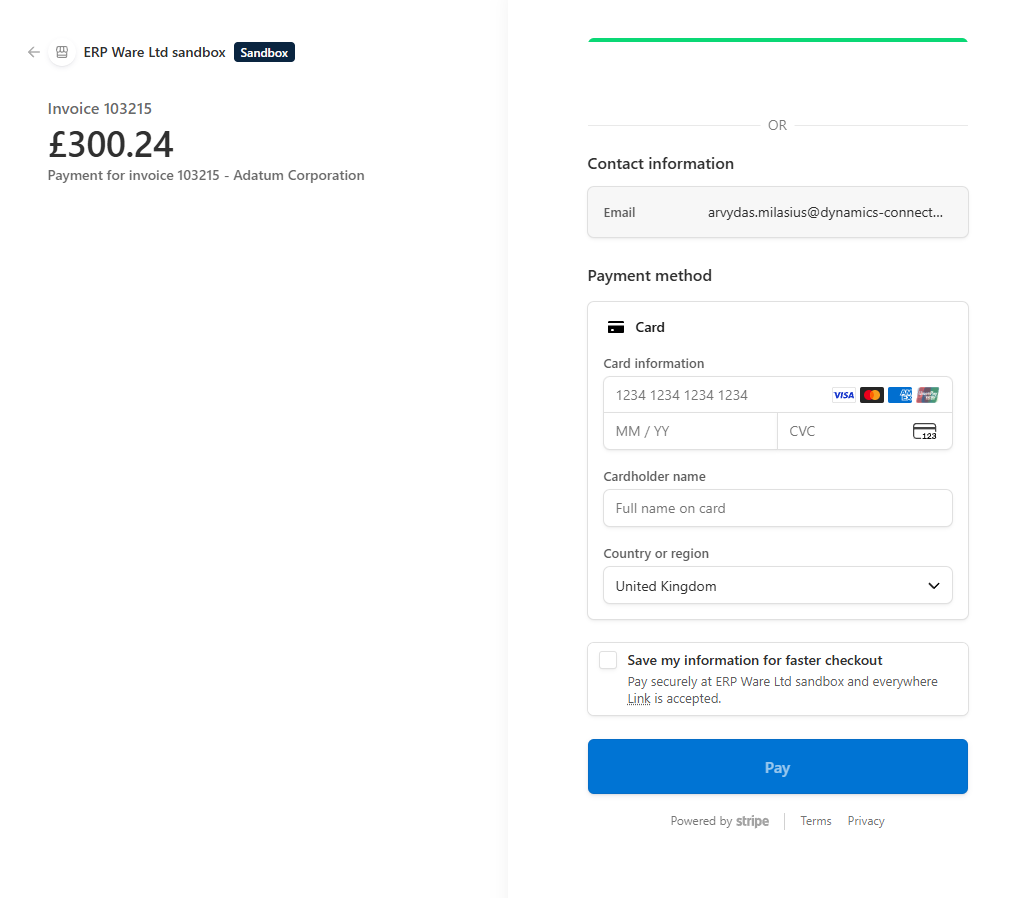
Secure, seamless payment experience
Sales Quotes
Quote Management
Customers can review sales quotes, check pricing, and see quote expiration dates.
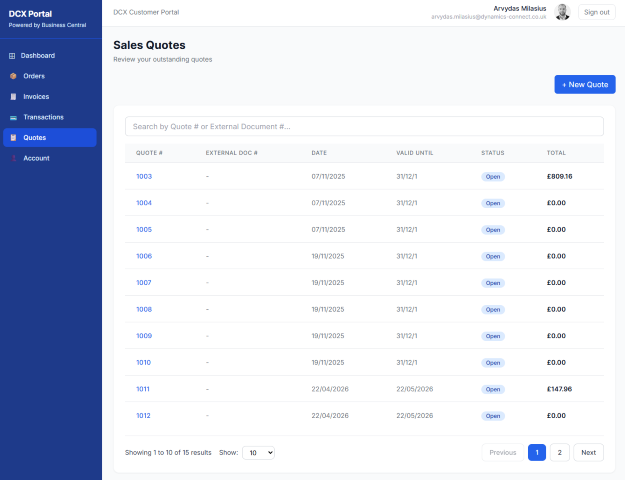
Clear view of active and converted quotes
Quote Details
Access complete quote information including:
- Quote number and date
- Valid until date
- Line items with quantities and pricing
- Special terms and conditions
- Status tracking (Open, Converted, Expired)
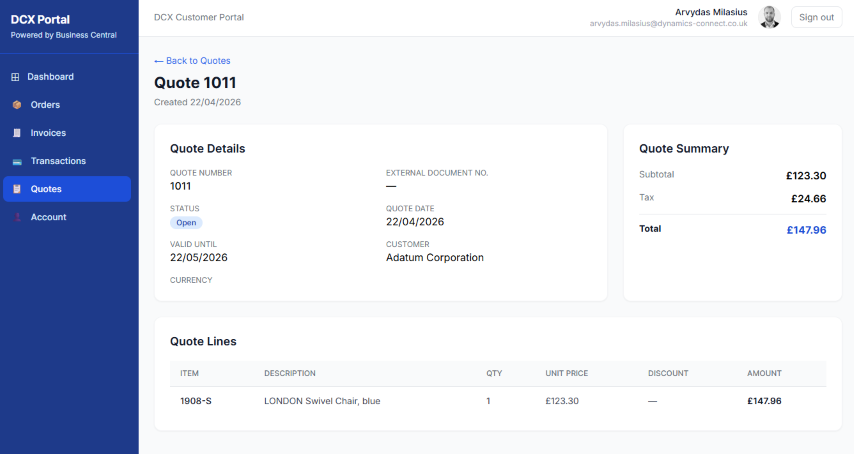
Comprehensive quote information for decision making
Create New Quotes
Customers can create new quote requests directly from the portal, streamlining the sales process.
- Self-Service Quote Creation. Request quotes without calling or emailing
- Item Selection. Browse and select from available products and services
- Quantity Specification. Define quantities and requirements
- Special Requests. Add notes and special instructions
- Instant Submission. Quotes sync automatically to Business Central for processing
- Status Tracking. Monitor quote progress from submission to approval
This self-service capability reduces response time and improves customer satisfaction by eliminating back-and-forth communication for quote requests.
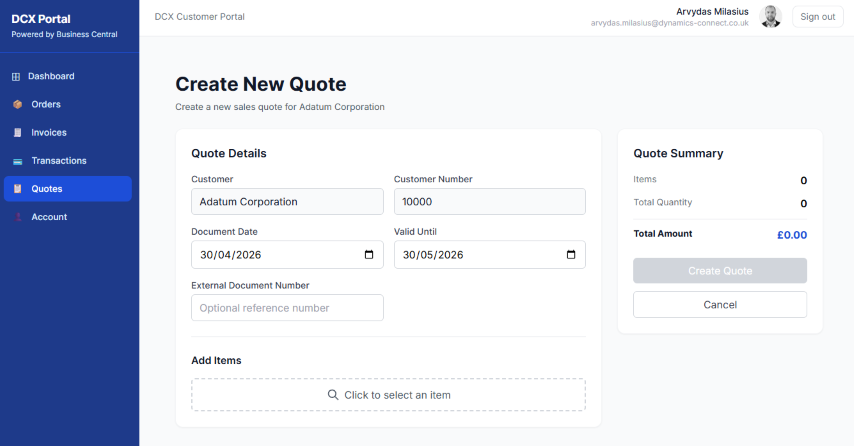
Self-Service Quote Creation
Transaction History
Transactions
Complete visibility into all customer transactions including invoices, payments, credit memos, and adjustments.
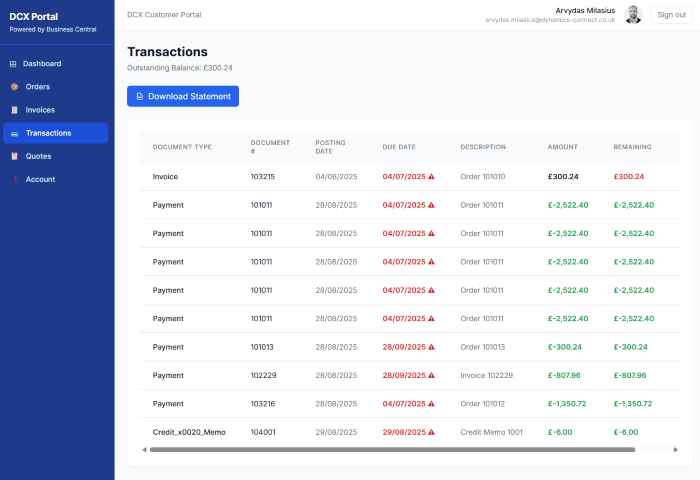
Detailed transaction history for complete transparency
Transaction Details
View detailed information for each transaction:
- Entry type (Invoice, Payment, Credit Memo)
- Posting date
- Due date
- Document number
- Description
- Amount
- Remaining amount
- Open/Closed status
Clear categorisation of transaction types
Business Benefits
For Your Customers
-
24/7 Access
View orders, invoices, and account info anytime, anywhere
-
Self-Service
Reduce dependency on phone calls and emails
-
Real-Time Data
Always up-to-date information from Business Central
-
Instant Payments
Pay invoices online with credit cards
-
PDF Downloads
Download invoices and statements instantly
-
Mobile Friendly
Access from any device with a modern browser
For Your Business
-
Reduce Support Calls
Customers can find information themselves
-
Faster Payments
Online payment options accelerate cash flow
-
Better Customer Experience
Modern, professional portal interface
-
Secure Authentication
Microsoft SSO with MFA support
-
No Duplicate Data Entry
Direct integration with Business Central
-
Customisable Branding
Match your company's look and feel
User Experience
Intuitive Navigation
Clean, modern interface with sidebar navigation makes it easy for customers to find what they need.
Simple, intuitive navigation structure
Responsive Design
Works seamlessly on desktop, tablet, and mobile devices.
Professional Look & Feel
Modern design with attention to detail creates a professional impression that reflects well on your business.
Perfect For
-
Wholesale & Distribution
Companies with many customer accounts
-
Manufacturing
Businesses with complex orders and invoicing
-
Service Companies
Needing to provide invoice access to clients
-
B2B Organisations
Wanting to improve customer self-service
-
Any Business
Using Business Central and wanting to enhance customer experience
Quick Setup
The portal is designed for rapid deployment:
-
Deploy to Azure
One-click deployment with Azure Developer CLI
-
Configure Business Central
Install the extension and enable API access
-
Set Up Authentication
Configure Microsoft Entra ID app registration
-
Enable Customers
Mark contacts as portal-enabled in Business Central
-
Go Live
Share the portal URL with your customers
Getting Started
Ready to give your customers 24/7 access to their Business Central data?
-
Documentation
Complete setup and user guides included
-
Support
Comprehensive administrator and troubleshooting guides
-
Customization
Source code included for custom modifications
-
Updates
Regular updates and improvements
Transform Your Customer Experience
Give your customers 24/7 access to their Business Central data with the DCX Customer Portal.
Contact us to find out how the Customer Portal can benefit your business.
Contact us